
Choosing the right Hard Drives - Seagate Ironwolf 12tb NAS drives

As a photographer, there are parts of my setup that I could not tell you how they work, I just know (and most of the time ‘hope’ with all fingers & toes crossed!) that they do ‘just work’. Hard drives are very much in the ‘close my eyes and ‘hope’ they work category. However, when I setup my new ‘Network Attached Storage’ (NAS for short), I knew that I had to do a little more research as standard hard drives simply wouldn’t cut it.
So first things first, what is a NAS and what planet do they come from?? Very, very simply put, NAS is just a way of attempting to protect your data against loss from hard disk failure by copying data across multiple disks. The premise being that if one disk fails, the data is either ‘mirrored’ on another disk or by using some extremely complex computer wizardry, re-built by the other disks, restoring the data lost from the failed disk. The difference in how your data is protected depends on what ‘RAID’ setup you choose. RAID, or Redundant Array of Independent Disks as it’s catchily titled) can be a bit difficult to get your head around at first, so I’ll save the complex stuff for another blog post.
So why do you need different drives with NAS? The first and main difference is that in general, NAS requires higher capacity drives as you are essentially storing ‘all’ of your data and depending on your RAID setup, this will commonly require multiple drives. I chose the simplest option of RAID 1 - which means that data will be mirrored from one disk to another, meaning I would need two disks of equal capacity. However, before diving straight in and buying the largest drives you can find, it’s always worth doing a little prep work.
I started by looking at exactly ‘what’ I wanted to protect. I use two seperate computers, a Macbook Pro for the majority of my day-to-day work and a PC for bulkier editing and long-term storage. Fortunately, most NAS setups will allow you to store data from different platforms. Next I looked at the most important things that needed protecting. Well, quite simply it is my image library - which comprises of some 70,000 photos and you can throw around 50 video projects on top of that. Finally, there were some day-to-day documents relating to my business and a handful of ‘holiday snaps’ and things that I would like protecting. All of this data soon added up and I knew that I was looking at disks in the Terabytes!
The next thing to consider is the performance of the disks. With my NAS setup (which I will cover in an additional blog post) I knew that I wouldn’t be editing directly from the storage device. I would be saving new images to my MacBooks internal SSD - editing what I needed, exporting client photos to DropBox and then moving the completed projects to an ‘Archive’ - which in this case would be the NAS. This meant that I could reduce the files held on my ‘working’ computer and add an element of protection by storing the files (& Lightroom catalog) on the NAS. I also knew that I would need to access that data 24 hours a day - so the NAS would always be on - additional strain on the required hard drives.
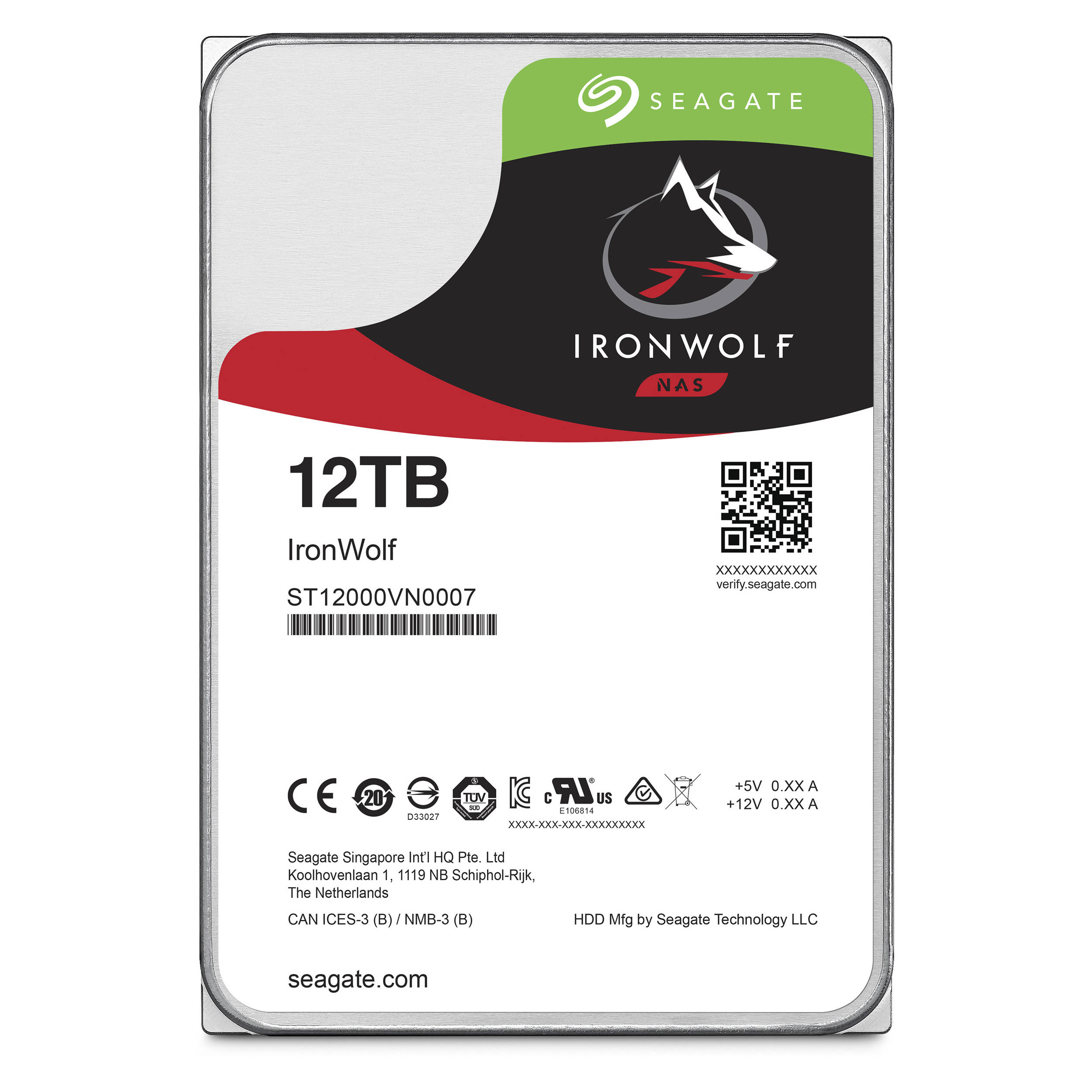
Taking all this into account, I knew that I had to choose ‘NAS’ rated drives. These drives are design for much longer run times and have more protection against vibrations, reducing the risk of mechanical failure. As I did my research, I kept coming across Seagate, who certainly have a great reputation in this market and in particular, their ‘Ironwolf’ range of disks. Apart from having a really cool name, these disks also looked like they packed a decent punch, with excellent benchmarking results for both read & write performance and power management - which were all concerns I had about choosing the right disks.
The next big question was ‘what size disks?’ - when it comes to size, it’s a bit of a personal question and I always believe bigger is better. However, in this case, it was completely justified. I knew that I had around 6tb of essential data that I needed protecting. Considering that doing photo and video work, I will be adding around 2tb a year minimum, I needed to find disks large enough to give me a couple of years worth of storage before having to upgrade. My options were becoming slim and I kept coming across the same answer, ‘Ironwolf 12tb’ - it looked like we have a winner.

QNAP TS-453-B NAS
Fast forward a few months and the disks are in the NAS and I am very pleased to say, performing as desired. These are not cheap hard drives, in fact they are very expensive, but you are getting a lot of ‘bang for your buck’ I could have also plumped for more, smaller drives, but choosing RAID and disks is quite a personal choice and this felt like the best setup for me at the time.
In conclusion, I am really impressed by these disks. They are a huge capacity and in terms of performance, they haven’t missed a beat. They are speedy enough to get quick access to your data and run quietly and efficiently. As stated at the beginning, this really isn’t my area of expertise but what I can say is that I feel comfortable leaving the hardware to do the hard work and live safe in the knowledge that my data has an added layer of protection against mechanical failure.
Check back soon as I will be writing a new post about how I manage my data and my workflow from start to finish.
For more information about Seagate Drives, click HERE
REVIEW: BenQ SW271 - 27" IPS LED Monitor - 4K UltraHD

Professional and Amateur photographers alike are aware of the importance of accurate colours in your images. Whether it's print or on screen, the colours need to be exactly how we wish to portray them and the only way to achieve this is by starting with a good quality monitor. Fortunately, BenQ has been producing some outstanding monitors in recent years and giving the big boys a run for their money! So how would the SW271 stack up? Keep reading to find out...
The SW271 is a 27 inch, 16:9 (3840x2169 pixels), 4K UHD monitor packing some seriously high-end features, such as:
99% Adobe RGB Colour Space with IPS technology
27 Inch 4K UHS resolution
High Dynamic Range (HDR)
Hardware Calibration with Palette Master Element Software
USB-C™ for transmitting data and video signal with one cable
10 Bit colour depth (If using HDMI 2.0/DisplayPort & an appropriate GPU)
Hot key puck
Built in Colour Calibration
Shade Supplied

Build Quality, Size & Connectivity
As a user of the SW271's big brother, the SW320 - I'm well aware that for many rooms, the SW320 can be a bit 'too' bulky, it's certainly no shrinking violet. So I was pleased to see that the SW271 keeps BenQ's simple yet stylish design theme but with slimmer bezels and a more lightweight and maneuverable feel than it's hefty relative. The matte grey plastic feels good quality and the metal stand articulates well and feels lightweight to move, but reassuringly sturdy.
BenQ clearly put a lot of thought into their design and even though it may not have some of the gimmicks of other monitors such as flashy LED's, BenQ manage to make an attractively minimalist monitor without it looking boring. Furthermore, it feels like a quality product and worth the cost as even simple things like the quality of the buttons, with their satisfying 'click' when pressed, that remind you that this is not a cheap product.
The SW271 fills a very nice hole in the size range, meeting the ever important 4k demands with a beautifully clear screen that is more than capable of giving editing software such as Lightroom, Photoshop, and Final Cut some much-needed breathing space. The 27inch panel can easily be flipped into a vertical orientation and the need cable tidy aperture on the stand keeps everything where it needs to be.
Talking of cables, connectivity should not be an issue with the SW271 with two HDMI 2.0 ports, a DisplayPort input, two USB Gen1 Ports and a USB XXXXXXXXXXXXXXXX

Performance
So the big question, is how does it perform? Well straight out of the box, this thing is a beast. BenQ calibrates all of their high-end monitors in the factory and for added reassurance, you get a calibration report in the box, boasting some very impressive figures. The 4k UHD is clearly targetted at those who require attention to fine detail either when viewing and editing photos or video. The monitor certainly delivers on that front and clean and crisp with good contrast. The 27-inch size makes it a pleasure to work on and gives you plenty of space on the screen to make sure that editing tools are not eating into valuable display space.
Colour accuracy is superb and with hardware calibration, achieving accurate colours is a breeze. Moving between colour spaces (RGB, AdobeRGB, black & white, Rec. 709, DICOM, DCI-P3, or HDR10) is a doddle with the 'Hot Key Puck' (which is just one of BenQ's really well thought out features) or the really easily navagated menu system. The supplied shade and really usable connectivity show that BenQ understand the needs of photo and video editors.


Conclusion
Straight out of the box, the SW271 is clearly a high-end product, built with Photographers & Videographers clearly in mind. The build quality is excellent and feels like a reassuringly sturdy monitor, without being too 'heavy' looking thanks to the thin bezels and clean design. It is feature rich and added bonuses such as the supplied shade, SD Card reader and BenQ's clever 'Hot Key Puck' should not be overlooked. It also ships with all the necessary leads and cables to get you started, straight out of the box.
Most importantly though, it packs a punch, providing the kind of quality that I have come to expect from it's bigger (and pricier) brother, the SW320. The 4k is certainly welcome and can be a real benefit for photo editing but it really comes into its own when video editing. More importantly, the wide colour gamut and Hardware calibration go a long way in terms of giving you confidence in your colour reproduction (though it is still necessary to regularly calibrate your monitor/printer etc. to ensure accuracy). Details look great on this monitor and I never found any of the darker colours to look muddy and gives you confidence in your editing.
There is no getting away from the fact that the monitor cannot be classed as 'budget friendly'. However, compared to similarly specced monitors, it actually starts to look like a great option. The sheer size is great to work with and will definitely benefit those that need to focus on finer details. One minor downside is the lack of a powered USB-C that would be a nice touch. However, additions such as the Hot Key Puck and the supplied shade, show you that BenQ mean business and have put a lot of thought into their target market. All in all, it's a great monitor and should be on the consideration list for any Pro/Amateur togs & videographers out there.
For more information about the monitor and how to purchase (not affiliated) please click HERE
WATCH THE REVIEW BELOW:
Introduction to NAS & The QNAP TS-453-B

All Photographers and videographers should be taking how and where they store their data very seriously! By now, you will probably have heard of Network Attached Storage or NAS for short. In this video I will give you a quick introduction to NAS and an unboxing and look at the features of the QNAP TS-453 B - a high quality and feature rich unit which on this occasion had been filled with the Seagate Ironwolf drives.
Very soon I will be doing a video series of videos on RAID, Storage and workflow but for now, take a look around the QNAP in the video below:
REVIEW: Rogue FlashBender 2 XL Pro Lighting System

Photography is quite a simple thing really. It all boils down to understanding and controlling light. Obviously, it can be quite difficult to control natural light, but when it comes to artificial or studio lighting, you can get really creative. This is where products like the Rogue FlashBender 2 XL Pro Lighting System become the photographers best friend!
The kit is basically a Speedlite modifier, but to call it 'basic' really does not do this product justice. The ingenious design allows you to carry a range of light modifying tools all in a stylish pouch that could fit comfortably in most photography bags, taking up about the same amount of space as a 200mm lens. The kit contains the reflector, softbox and strip grid that can be combined in multiple ways. The build quality is excellent and even after a few minutes of handling it, you know it's a quality product.
For those new to light modifiers, this kit allows you to modify and shape the light that comes out of your Speedlite. You can control the 'amount' of light emitted by the controls on the Speedlite or by using TTL (Through the Lens) but this does not allow you to control 'how' the light is dispersed. This is where the FlashBender comes in. The large reflector allows you to create a much large light source and softens the overall nature of the light, giving a more pleasing result. However, the reflector itself can be shaped (thanks to the internal metal ribs) into more of a cone shape or a cylindrical shape to allow you to focus the light on one spot.




The reflector itself attaches to your Speedlite via a belt that wraps around the top of your light and it's lightweight construction means that you will not be battling with weight. It is ideal for use with the Speedlite on a stand and even though the reflector is large, it never feels unruly and easy to manage. It's amazing portability makes it an ideal solution for location-based shoots where it may be impractical to use a traditional softbox. The portability was one of the main selling points for me as I found it ideal to just leave in my bag and grab whenever needed.

The kit also contains a very useful Softbox, which I found amazingly useful for product photography. Being able to diffuse the light makes a huge difference to the quality of images that you can produce. The FlashBender kit diffusion fabric gave a pleasing result and I even found myself getting quite experimental by using the fabric at a variety of distances from the light source to get different results. This is one of the real hidden beauties of this kit, the versatility of the products allows you to really experiment with your photography, knowing that you have complete control over the light.
Finally, the grid spot allows you to concentrate the light on a subject, whether it is diffused or not and is an ideal option for portrait photographers, looking to pick their subject out either in the studio or on location. The grid is flexible and folds down comfortably in the supplied pouch but is also incredibly quick to assemble, making use of the velcro system. It's great working in the knowledge that you have all the tools you may need to hand.

In conclusion, where it may be possible to get slightly better results with traditional softboxes etc. they are not always practical. This is where the FlashBender 2 XL Pro kit really comes into its own. I haven't seen another lighting modifier that can get such great results and be so portable. Having used a Godox head with a 95cm octagon and a C-stand for a while, I found myself reaching for a flashgun and the FlashBender kit more often than not purely because of the portability and knowing I could still get great results. At around £90, the kit is great value for money when you consider the world of options that it will open up for you!
Find out more at the Rogue website - HERE